



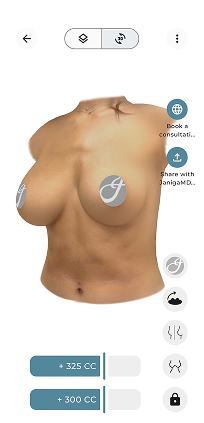

We say it in every consultation: 375 cc on one patient looks nothing like 375 cc on another. Chest width, breast shape and skin all change the outcome. A simulation on your own body gets us past the numbers and into what you actually want.
Left and right, set separately. Most women aren’t symmetrical, and the app doesn’t pretend otherwise.
Profile view, not just front. Turn the 3D model and see projection from the side — the angle a mirror can’t give you.
One tap switches between the two. Both run on your own body — the sliders set left and right independently, in cc.
Augmented reality places the implant on the picture you just took — the version you recognise from the mirror. Slide the cc up and down and watch it change in place.

The 3D model is built from your three photos. Rotate it to judge projection and side view — the angle no mirror and no before-and-after gallery can show you.

A phone, a plain wall and good daylight. No scanner, no extra visit, no cost to you as our patient.
Get myArbrea from the App Store or Google Play. On first open, type janigamd to unlock it as our patient.

Front, left side, right side. Follow the outline on screen — arms relaxed, plain wall, daylight. It tells you when you’re framed right.

Move the cc slider for each side, switch to the 3D model, turn it, study the profile. Save as many versions as you want to discuss.

Tap Share with Janiga MDs. We’ll have it before your appointment, so your consultation starts with what you already like.

They stay in your app, on your phone. Nothing is posted anywhere. Nothing reaches us unless you choose to send it.
It’s an accurate visual guide built from your own measurements — not a promise of a surgical result. We review it together and tell you honestly what’s realistic.
No. The code janigamd unlocks it free for patients of our practice.
Yes — and it will be a better one. You arrive knowing what you like, so we spend the time on your anatomy, your options and your recovery.
Retake them as many times as you want, or delete them entirely. You’re in control of every image in the app.
Neither are most of our patients on day one. Call the office and we’ll walk you through it in a couple of minutes.
The simulation runs inside your own app. Your photos aren’t published, aren’t sold and aren’t shared — until you tap send, and the only place they go is our office.

Download myArbrea, enter janigamd, and bring your 3D result to your next appointment with us.

Founded in 2010, the team at JanigaMDs has been proven to provide the utmost care for all patients. With an almost 5 star rating over almost 700 reviews, JanigaMDs is the premier aesthetic practice in Northern Nevada.
Contact Us"*" indicates required fields
 Search
 Download for iPhone
 Download for Android